This post was originally posted in July 2018 by Pedro Rolo and updated in June 2020 by Tiago Madeira .
There are several features making Ruby on Rails attractive, though where it really shines is when it comes to getting information from relational databases. Its ORM -Active Record - now offers a very mature interface - striking the right balance between conciseness and power.
In this article I will provide some simple examples of how to extract information from a database. This is not meant to be a comprehensive guide, but rather a set of tools that I've been finding useful in my everyday's work. Also, what I'm presenting below is based on the most recent Rails update (Rails 6).
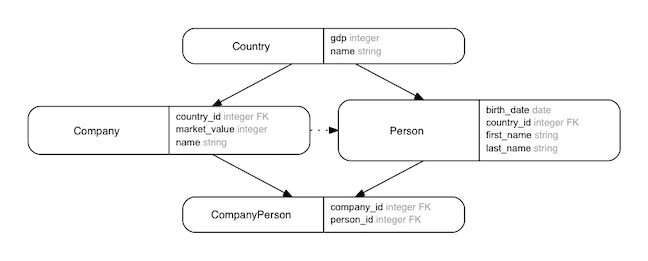
I'll start by defining a domain model against which I will run my queries:
We use the following domain model in our examples:
class Country < ApplicationRecord
  has_many :people
  has_many :companies
end

class Person < ApplicationRecord
  belongs_to :country
  has_many :company_people
  has_many :companies, through: :company_people
end

class Company < ApplicationRecord
  belongs_to :country
  has_many :company_people
  has_many :people, through: :company_people
end

class CompanyPerson < ApplicationRecord
  belongs_to :company
  belongs_to :person
end
Basically, Person and Company belong to a Country, and Person and Company have a many-to-many relationship between them, which is stored in the relationship table CompanyPerson.
The #activerecord is what binds the model in our ruby application with its respective database table. The Active record object comes with a set of methods to help us query database records so theres no need to use raw SQL. For comparation purposes will present the translation of our activerecord queries to sql queries. You can easly do this translation using #to_sql.
The most simple queries only involve a single table and attempt to get the records that have certain specific values on their columns.
For instance, let's say we want to find who has John as first name:
Person.where(first_name: "John")
#=> #<ActiveRecord::Relation [#<Person id: 6941, first_name: "John", last_name: "Swift", birth_date: "1986-04-30", country_id: 68, created_at: "2018-05-28 16:32:50", updated_at: "2018-05-28 16:32:50">]>

# We can print our queries by using #to_sql
Person.where(first_name: "John").to_sql
# SELECT "people".* FROM "people"
# WHERE "people"."first_name" = 'John'
We may also use arrays of desirable values instead of single values. That will generate queries that use the IN SQL keyword:
Person.where(first_name: ["Peter", "John"]).to_sql
# SELECT "people".* FROM "people"
# WHERE "people"."first_name" IN ('Peter', 'John')

Person.where(first_name: ["Peter", "John"])
#=> #<ActiveRecord::Relation [#<Person id: 5039, first_name: "Peter", last_name: "Corkery", birth_date: "1910-10-30", country_id: 63, created_at: "2018-05-28 16:32:19", updated_at: "2018-05-28 16:32:19">, #<Person id: 6941, first_name: "John", last_name: "Swift", birth_date: "1986-04-30", country_id: 68, created_at: "2018-05-28 16:32:50", updated_at: "2018-05-28 16:32:50">]>
Additionally to arrays, ranges are also accepted as value predicates:
Person.where(birth_date: (10.years.ago..5.days.ago))
# SELECT  "people".* FROM "people" WHERE "people"."birth_date"
# BETWEEN '2008-05-30' AND '2018-05-25'
You can also have endless ranges:
# and for objects, we can use infinity on the ranges
Person.where(birth_date: (10.years.ago..Date::Infinity.new))
# SELECT  "people".* FROM "people" WHERE "people"."birth_date" >= '2008-05-28'
which now with Rails 6 can simply be written like:
# and for objects, we can use infinity on the ranges
Person.where(birth_date: (10.years.ago..))
# SELECT "people".* FROM "people" WHERE "people"."birth_date" >= '2008-05-28'It's possible to constraint our queries to several simultaneous predicates. We can either provide #where an hash with several keywords or we can chain several invocations of #where:
Person.where(first_name: ["Peter","John"],
             last_name: "Swift")
      .to_sql
# SELECT "people".* FROM "people"
# WHERE "people"."first_name" IN ('Peter', 'John')
#       AND "people"."last_name" = 'Swift'

Person.where(first_name: ["Peter","John"])
      .where(last_name: "Swift")
      .to_sql
# SELECT "people".* FROM "people"
# WHERE "people"."first_name" IN ('Peter', 'John')
#       AND "people"."last_name" = 'Swift'
If otherwise we wish to compose our predicates with an OR we may use #or.
are_swifts = Person.where(last_name: "Swift")

Person.where(first_name: ["Peter","John"])
      .or(are_swifts)
      .to_sql
# SELECT "people".* FROM "people"
# WHERE ("people"."first_name" IN ('Peter', 'John')
#       OR "people"."last_name" = 'Swift')
When we are searching just for a specific row we may use #find_by instead, which stops searching once it finds the first match by using LIMIT 1
Person.find_by(first_name: "Peter").to_sql
# SELECT  "people".* FROM "people"
# WHERE "people"."first_name" = 'Peter'
# LIMIT 1
Or we may provide our own custom limit by chaining #limit to our #where queries:
Person.where(first_name: "Peter").limit(10).to_sql
# SELECT "people".* FROM "people"
# WHERE "people"."first_name" = 'Peter'
# LIMIT 10It's possible to get the records not matching a certain condition by using #not together with #where:
Person.where.not(first_name: "Peter").to_sql
# SELECT "people".* FROM "people"
# WHERE "people"."first_name" != 'Peter'

Person.where(first_name: "Peter")
      .where.not(last_name: "Swift")
      .where(birth_date: 30.years.ago)
      .to_sql
# SELECT "people".* FROM "people"
# WHERE "people"."first_name" = 'Peter'
# AND "people"."last_name" != 'Swift'
# AND "people"."birth_date" = '1988-05-28'It's possible to use #order to sort the results is ascending or decending order:
Person.where.not(last_name: "Swift")
      .order(birth_date: :desc,
             created_at: :asc)
      .to_sql
# SELECT "people".* FROM "people"
# WHERE "people"."last_name" != 'Swift'
# ORDER BY "people"."birth_date" DESC,
# "people"."created_at" ASCThere are several functions that allow folding a query result into certain values, such as #count, #maximum, #minimum and #average:
Person.count # => 500
# SELECT COUNT(*) FROM "people"

Person.average(:birth_date) # => Mon, 01 Jan 1962
# SELECT AVG("people"."birth_date") FROM "people"

Person.maximum(:birth_date) # => Sat, 26 May 2018
# SELECT MAX("people"."birth_date") FROM "people"

Person.minimum(:birth_date) # => Mon, 29 Jun 1908
# SELECT MIN("people"."birth_date") FROM "people"
Additionally, it's possible to group elements by a given column and fold these elements with those folding functions, thus performing GROUP_BY queries:
Person.group(:last_name).count
# SELECT COUNT(*) AS count_all,
#        "people"."last_name" AS people_last_name
# FROM "people"
# GROUP BY "people"."last_name"
# => {"Abbott"=>13, "Abernathy"=>12, "Abshire"=>16, "Adams"=>18,
# ... truncated result ...

Person.group(:last_name)
      .average(:birth_date)
# SELECT AVG("people"."birth_date") AS average_birth_date,
#        "people"."last_name" AS people_last_name
# FROM "people" GROUP BY "people"."last_name"
# => {"Abbott"=>#<BigDecimal:7fd61693d160,'0.1959307692 30769E4',27(36)>,
# "Abernathy"=>#<BigDecimal:7fd61693cda0,'0.19655E4',18(36)>,
# ... truncated result ...The most common use case regarding multiple tables is about eager loading some entities that are related to our selected model, which might be, for instance, iteratively accessed. This problem is commonly known as the 1 + N queries problem and the following interaction makes it evident:
lazy_people = Person.where(last_name: "Smith")
lazy_people.map(&:country).map(&:name)
# SELECT "people".* FROM "people"
# WHERE "people"."last_name" = 'Smith'
# SELECT  "countries".* FROM "countries"
# WHERE "countries"."id" = 42 LIMIT 1
# SELECT  "countries".* FROM "countries"
# WHERE "countries"."id" = 60 LIMIT 1
# SELECT  "countries".* FROM "countries"
# WHERE "countries"."id" = 70 LIMIT 1
# SELECT  "countries".* FROM "countries"
# WHERE "countries"."id" = 68 LIMIT 1
# SELECT  "countries".* FROM "countries"
# WHERE "countries"."id" = 67 LIMIT 1
# SELECT  "countries".* FROM "countries"
# WHERE "countries"."id" = 64 LIMIT 1
# ...
# => ["Czech Republic", "Wallis and Futuna", "Belize", "Cuba", "Kuwait",
# "Liberia", ...]
As we see, a new query is performed each time we iterate a person to access its country.
#includes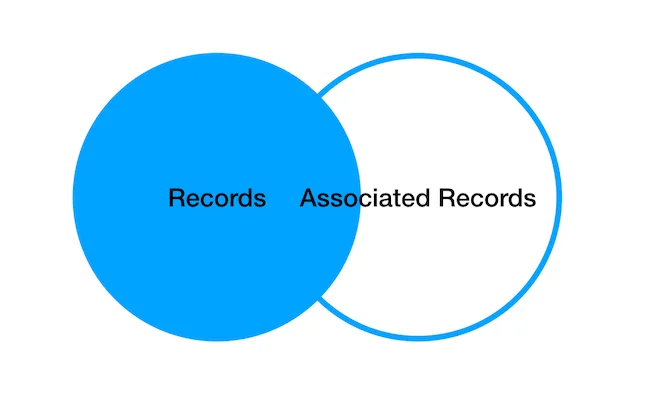
#includes enables us to eager load all the data at once, thus optimizing what is performed above. It behaves as a LEFT OUTER JOIN, thus loading all the entries of the related model that concern our main model entries.
eager_people = Person.where(last_name: "Smith")
                     .includes(:country)
# SELECT  "people".* FROM "people"
#  WHERE "people"."last_name" = 'Smith'
# SELECT "countries".* FROM "countries"
#  WHERE "countries"."id" IN (42, 60, 70, 80, 95, 102, 105, 200)

# and now we can iterate the models and relations
# without having to perform additional queries in
# order to extract e.g. the name of each country
eager_people.map(&:country).map(&:name)
# => ["Czech Republic", "Wallis and Futuna", "Belize", "Cuba", ...]
But, wait, that is not a LEFT OUTER JOIN - you might say! Well, as there are no additional constraints on the countries we are selecting, Rails prefers to resort to a WHERE id IN query, taking advantage of the primary key index. Though, if we add constraints to our query active record performs a LEFT OUTER JOIN instead:
eager_people = Person.includes(:country)
                     .where(countries: {
                              gdp: -Float::INFINITY..1000000})
# SELECT  "people"."id" AS t0_r0,
#         "people"."first_name" AS t0_r1,
#         "people"."last_name" AS t0_r2,
#         "people"."birth_date" AS t0_r3,
#         "people"."country_id" AS t0_r4,
#         "people"."created_at" AS t0_r5,
#         "people"."updated_at" AS t0_r6,
#         "countries"."id" AS t1_r0,
#         "countries"."name" AS t1_r1,
#         "countries"."gdp" AS t1_r2,
#         "countries"."created_at" AS t1_r3,
#         "countries"."updated_at" AS t1_r4 FROM "people"
# LEFT OUTER JOIN "countries" ON "countries"."id" = "people"."country_id"
# WHERE "countries"."gdp" <= 1000000
# => ["Czech Republic", "Wallis and Futuna", "Belize", "Cuba",...]
What's to be noticed in the example above is the use of an hash on the where condition in order to specify constraints on our referenced models.
We may also eager load several relations at once:
Person.includes(:country, :companies)
# SELECT  "people".* FROM "people"
# SELECT "countries".* FROM "countries"
#  WHERE "countries"."id" IN (5, 34, 50, 60)
# SELECT "company_people".* FROM "company_people"
#  WHERE "company_people"."person_id" IN (24, 10, 41, 35)
# SELECT "companies".* FROM "companies"
#  WHERE "companies"."id" IN (3, 32, 23, 65, 23)
And it is also possible to do so in a nested fashion, by passing a relationships hash instead:
Person.includes(country: :companies)
# SELECT  "people".* FROM "people" LIMIT ?  [["LIMIT", 11]]
# SELECT "countries".* FROM "countries"
# WHERE "countries"."id" IN (23,34,6,34,3,2,6,7)
# SELECT "companies".* FROM "companies"
# WHERE "companies"."country_id" IN (5,3,7,3,4,2,1)
# SELECT  "people".* FROM "people"
#joins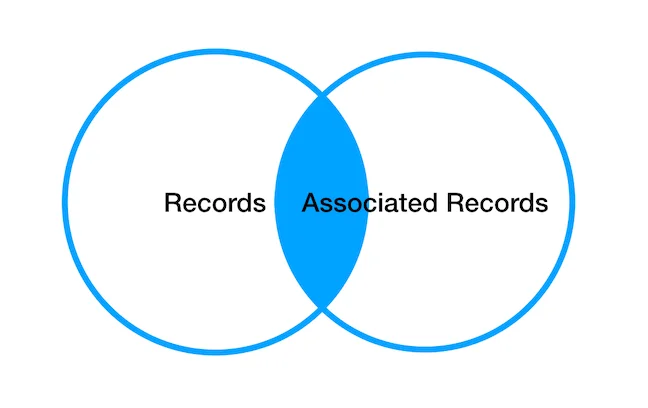
Sometimes we are only interested in the records that are associated with the related module. When this is the case, we use #joins, which has the semantics of an INNER JOIN.
We illustrate the need for this funcionality in the following example, where we only intend to iterate through people that indeed are associated with a country:
# given a certain ferdinand with no country
ferdinand_nobody = Person.find_by(country_id: nil)
# => #<Person id: 7042, first_name: "Fernando", last_name: "Pessoa",
# birth_date: "1888-06-13", country_id: nil,
# created_at: "2018-05-30 13:37:03", updated_at: "2018-05-30 13:37:03">

# when querying people-countries' names
Person.includes(:country).map(&:country).map(&:name)
# NoMethodError: undefined method `name' for nil:NilClass
#        from (irb):27:in `map'
#        from (irb):27

# because our ferdinand is in this list
Person.includes(:country).include?(ferdinand_nobody) #=> true

# and it country is nil
ferdinand_nobody.country #=> nil

# #joins to the resque
Person.joins(:country).include?(ferdinand_nobody) #=> false
# SELECT "people".* FROM "people"
# INNER JOIN "countries"
# ON "countries"."id" = "people"."country_id"

#=> all the people country names
Person.joins(:country).map(&:country).map(&:name)
# SELECT "people".* FROM "people"
# INNER JOIN "countries"
# ON "countries"."id" = "people"."country_id"
If we are only interested in records that are associated with a related model with specific attributes values, we can use #joins and then #where to specify constraints on our models.
Person.joins(:country).where(countries: { gdp: 110 })
#"SELECT "people".* FROM "people"
#INNER JOIN "countries"
#ON "countries"."id" = "people"."country_id"
#WHERE "countries"."gdp" = 110"
Well, all the queries written so far are pretty long. When they get complicated or are intended to be reused through our code it is convenient to give them names.
In older versions of rails, you should use the ActiveRecord::Base#scope class method to create such reusable queries. You are able to attain the same functionality by simply defining class methods:
def Person.adults
  _18_years_ago = (Time.now - 18.years)
  Person.where(
    birth_date: _18_years_ago..Date::Infinity.new)
end

def Person.from_big_economies
  Person
    .joins(:country)
    .where(countries: {
      gdp: 100_000.0..Float::INFINITY
    })
end
After defining the queries in such fashion, you are able to chain these high level abstractions together.
Person.from_big_economies.adults
# SELECT "people".* FROM "people"
# INNER JOIN "countries"
# ON "countries"."id" = "people"."country_id"
# WHERE "countries"."gdp" >= 100000
# AND "people"."birth_date" >= '2000-07-04'Arel is a domain-specific-language allowing to express your queries in relational algebra. In past versions of Rails it was rather common to have to resort to Arel in order to accomplish some rather frequently requested functionalities, though nowadays Rails 6's Active Record already covers most of these use cases.
I will start by presenting some of the already presented Rails 6 queries by using Arel instead of plain active record. And later focus on how to write some cases where one would still need Arel.
When creating Arel queries one usually starts by getting the Arel::Table objects of the SQL tables we want to interact with:
people = People.arel_table
# => #<Arel::Table:0x007ffc5def7c50 @name="people" ...>

countries = Country.arel_table
# => #<Arel::Table:0x007ffc5dcb2328 @name="countries" ...>
We can access the collums of our tables like an hash. From these tables one is able to define predicates (Arel::Node) invoking methods on its attributes, which are accessible through the method []:
The predicates #eq, #not_eq, #lt, #gt, #lteq, #gteq are equivalent to the operators =, !=, <, >, <=, >= and work like this:
countries_predicate =  countries[:gdp].eq(10000)
# => #<Arel::Nodes::Equality:0x00007fd0141a29d0 ...>

people_lt_predicate = people[:birth_date].lt(Time.now - 10.years)
# => #<Arel::Nodes::LessThan:0x00007fd00baa0798 ...>

people_gt_predicate = people[:birth_date].gt(Time.now - 20.years)
# => #<Arel::Nodes::GreaterThan:0x007ffc5e1c47d0 ...>
The #and & #or can be used to create multitable predicates and work in a similar way, like this:
or_predicate = countries[:gdp].gt(10000).or(people[:birth_date].gt(Time.now - 10.years))
# => #<Arel::Nodes::Grouping:0x00007fd0141d1ca8 ...>
and_predicate = countries[:gdp].gt(1000).and(countries[:gdp].lt(2000))
# => #<Arel::Nodes::And:0x00007fd0138b4648 ...>
We can later pass these predicates to #where, and as long as the required tables are joined the predicate will be successfully converted to SQL:
Person.joins(:country)
      .where(or_predicate)
# => SELECT "people".* FROM "people"
# INNER JOIN "countries"
# ON "countries"."id" = "people"."country_id"
# WHERE "countries"."gdp" > 10000
# OR "people"."birth_date" > '2008-07-04'This is a use case where one still needs to resort to Arel in order to obtain a database independent query. In order to do so one should combine the #matches Arel predicate with the % SQL wildcard:
people_last_name = Person.arel_table[:last_name]

Person.where(people_last_name.matches("A%"))
# SELECT  "people".* FROM "people"
# WHERE "people"."last_name" LIKE 'A%'
# => #<ActiveRecord::Relation [#<Person last_name: "Aufderhar" ... >, #<Person last_name: "Armstrong"...> ...]>
This returns people whose last_name start with the character "A".
Both Arel and Active Record have many more functionalities than the ones I've here presented. However they are more than enough to get started with applications with simple requirements.
In the end, it comes to preference choosing between ActiveRecord query methods or Arel, when doing our everyday queries. I find the ActiveRecord sintaxe easier to read and use, but Arel can be still useful when dealing with complex queries.

Rails developer with 10+ years of experience with diverse technologies. I am interested in functional programming.

Computer science student and ImaginaryCloud part-timer. Eager to learn new technologies and techniques. Tennis and piano player.
People who read this post, also found these interesting: